

Enterprise SAN Switch Summary
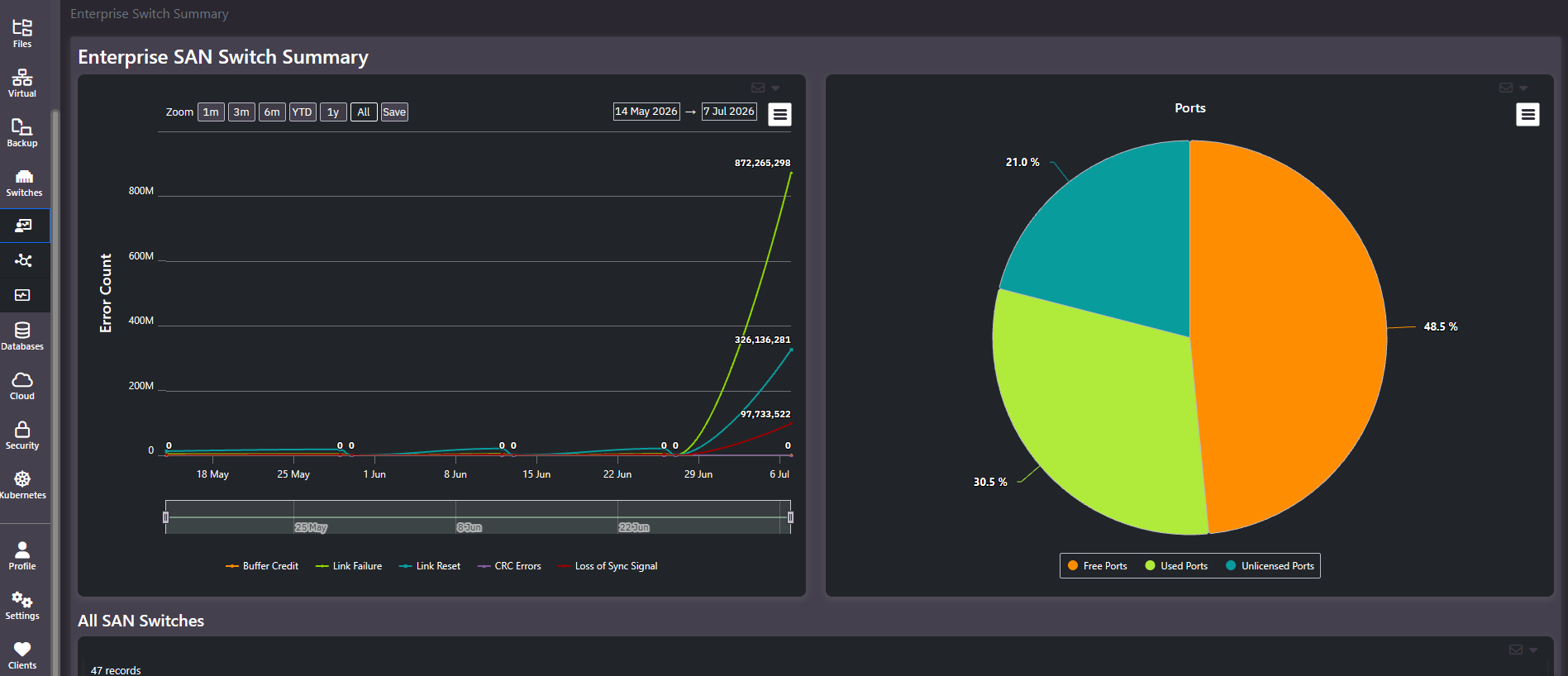
Purpose: Fabric health and port economics on one screen. Five fibre channel error types trended over time, a port breakdown across used, free, and unlicensed, and a grid of every SAN switch.
When to use it
- Check whether fabric errors are stable or escalating
- Find out how many ports you have paid for but cannot use
- Establish whether the fabric has room for new host or array connections
- Rule the fabric in or out when investigating unexplained storage latency
The error trend
A line per error type over the selected window, with zoom presets, explicit date pickers, a save control, an export menu, and a range brush.
| Error type | What it usually indicates |
|---|---|
| Buffer Credit | Flow control exhaustion, often congestion or a slow-drain device |
| Link Failure | The link went down. Cabling, optics, or the device at the far end |
| Link Reset | The link was reinitialized, frequently following credit starvation |
| CRC Errors | Frames arriving corrupted. Almost always physical: optics, cables, connectors |
| Loss of Sync Signal | The port lost signal lock, again typically physical |
These counters are cumulative, so the shape of the line matters more than its height. A steadily rising line is a counter that has never been cleared. A line that is flat and then climbs steeply is a real event with a start date, and that date is what to correlate against change records.
Error counts on a busy fabric reach very large absolute numbers, so do not judge severity by magnitude alone. Link failures and losses of sync rising together point at physical layer trouble, and the combination is more diagnostic than either count on its own.
Unlicensed ports are money already spent
The Ports pie splits across Free Ports, Used Ports, and Unlicensed Ports, and that third slice is the one worth attention. SAN switches are commonly sold with more physical ports than are activated, and the remainder require a port-activation licence.
So an unlicensed slice represents hardware you already own and cannot connect anything to. Two practical consequences. Free capacity is smaller than the port count suggests, because unlicensed ports are not available. And an expansion request may be satisfiable with a licence rather than a switch, which is a materially cheaper answer worth checking before any purchase.
Common actions
- Set the window to All to find where an error line changed slope, then narrow to that period.
- Read used against free, treating unlicensed as unavailable when assessing expansion headroom.
- Compare unlicensed count against a quoted switch purchase. Licensing existing ports is usually cheaper than adding hardware.
- Move to Switch Health Alerts to find which switches and ports the errors belong to.
Tips
CRC errors and losses of sync are physical layer symptoms. No amount of zoning, queue tuning, or array work will fix them. Treat them as a request for someone to inspect optics and cabling.
Related screens
Switch Health Alerts locates the errors this chart counts. Host LUNs shows the latency the errors produce at the LUN level. Enterprise Host Summary carries the per-host connected-switch count.