

Database Index Fragmentation
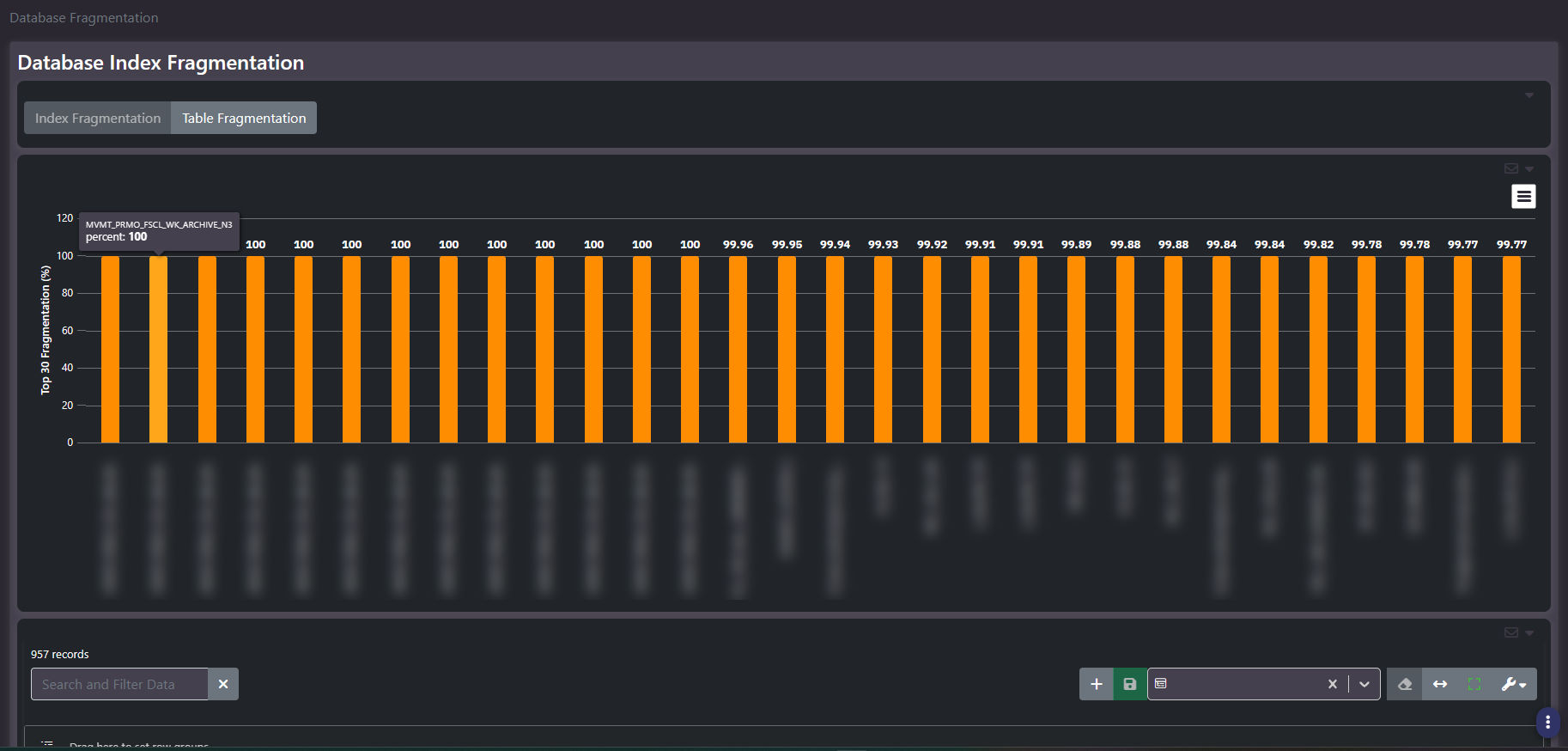
Purpose: Which indexes and tables have degraded and need maintenance. A tab group separating index-level from table-level fragmentation, each with a top-thirty chart and a detail grid.
When to use it
- Build a rebuild or reorganize worklist for a maintenance window
- Check whether an existing maintenance job is actually keeping up
- Investigate a query that has slowed without its plan changing
- Scope how much of the estate needs index maintenance at all
Key areas and metrics
- Tab group.
Index FragmentationandTable Fragmentation, switching the whole panel between the two scopes. - Chart. Top thirty by fragmentation percentage, one bar per object, with hover showing the object name and its exact percentage.
- Grid. The full result set beneath, sortable and groupable, typically running to hundreds or thousands of rows.
Fragmentation percentage alone is not a priority
A top-thirty chart on this screen will usually be a wall of bars at or near one hundred percent, because in any estate of size there are more fully-fragmented objects than thirty. That makes the chart poor at prioritizing: every candidate looks equally bad.
Two things separate the ones worth acting on. Size, because fragmentation on a small object has negligible effect and rebuilding it wastes a maintenance window, while a large fragmented index is a real performance cost. And whether anything reads it, since a heavily fragmented index no query uses is a candidate for removal rather than maintenance.
So the useful order is large and heavily fragmented and actively read. The chart gives you the third of those criteria only.
Index against table fragmentation
- Index fragmentation is logical disorder within an index structure, addressed by rebuilding or reorganizing that index.
- Table fragmentation concerns the underlying data pages, and is usually addressed differently depending on platform and table structure.
Check both tabs. An object appearing high in both is a stronger maintenance candidate than one appearing in a single view.
Common actions
- Work from the grid, not the chart. Sort by size where available, filtered to high fragmentation.
- Group by Database Name to find databases with no effective maintenance job, which usually show as whole clusters of fragmented objects.
- Cross-check against Unused Indexes. Do not spend a maintenance window rebuilding something nothing reads.
- Re-run after the window to confirm the maintenance job did what was intended.
Tips
Small objects routinely report high fragmentation and it is normal rather than actionable. Below a few hundred pages the measure is not meaningful, so filtering by size before reading percentage avoids a maintenance window spent on objects too small to matter.
Related screens
Unused Indexes identifies fragmented indexes not worth maintaining. Queries Performance shows whether fragmentation is affecting anything measurable. Missing Indexes covers the other direction of index work.