

Databases Missing Indexes
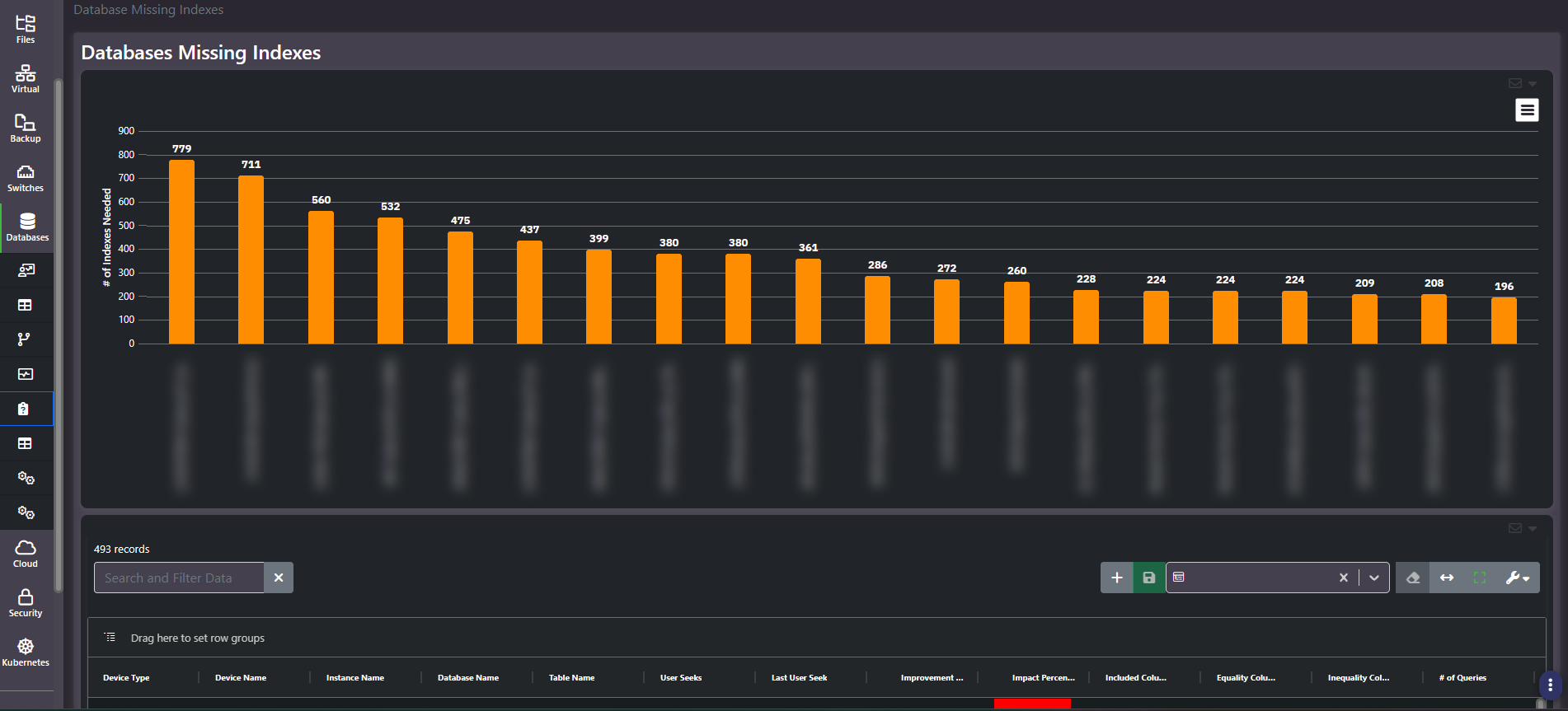
Purpose: Where the query optimizer wants indexes that do not exist. A ranked chart of tables by number of indexes needed, over a grid carrying the expected improvement, the columns involved, and how many queries would benefit.
When to use it
- Hand a DBA a prioritized, evidence-backed tuning list rather than a complaint about slowness
- Find the tables generating the most optimizer index requests
- Estimate the benefit of an index before creating it
- Identify whether a performance problem is an indexing problem at all
Key areas and metrics
The chart ranks bars by number of indexes needed, one per fully-qualified table, so the worst offenders sit on the left. The grid beneath carries Device Type, Device Name, Instance Name, Database Name, Table Name, User Seeks, Last User Seek, an improvement measure, Impact Percent, Included Columns, Equality Columns, Inequality Columns, and number of queries.
| Column | Why it matters |
|---|---|
| User Seeks | How many times a query would have used the index. High seeks means real demand, not a theoretical gain |
| Last User Seek | When that demand last occurred. An old date means the workload has moved on |
| Impact Percent | The optimizer’s estimate of the improvement |
| Equality, Inequality, and Included Columns | The index definition the optimizer is asking for |
| # of Queries | How many distinct queries would benefit |
Index count is not the priority order
The chart ranks by how many indexes the optimizer wants, which measures how much attention a table has had rather than how much benefit is available. A table requesting hundreds of indexes usually has a query pattern problem: many similar queries each asking for a slightly different index, where the real fix is a handful of well-chosen composite indexes or a change to the queries themselves.
Prioritize on impact and query count instead. An index benefiting many queries with high seeks and a recent last-seek date is worth creating. One with a large impact estimate and a handful of seeks from months ago is not.
Every index also costs write performance and storage, so the answer is never to create all of them. Treat the list as candidates for a DBA to evaluate, not as instructions.
Common actions
- Sort by number of queries descending rather than reading the chart order.
- Filter out old last-seek dates. Demand that has not recurred is not worth paying write cost for.
- Group by Database Name to see whether one application accounts for most of the estate’s index pressure.
- Read this alongside Unused Indexes. A database appearing in both is being indexed reactively rather than designed.
Tips
Recommendations come from the platform’s own optimizer statistics, which are reset by restarts and maintenance. A short statistics window understates demand, so check how long the instance has been up before concluding an index is unwanted.
The chart axis is effectively a list of your business applications, since database and table names name what the company does. Redact it before sharing.
Related screens
Unused Indexes is the other half of the indexing picture. Queries Performance shows the queries an index would help. Index Fragmentation covers maintenance of the indexes you already have.