

Databases Versions
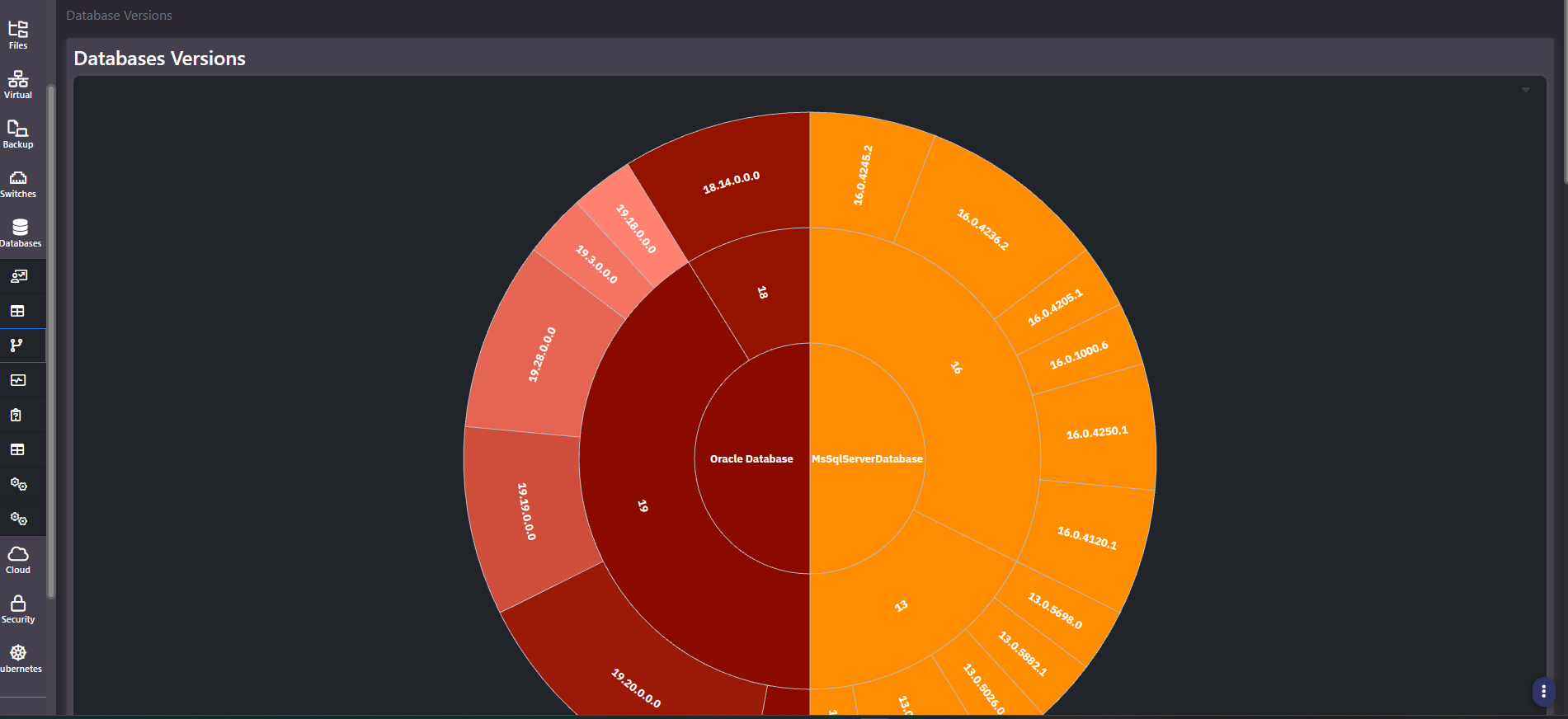
Purpose: The version and patch estate as a single picture. A three-level sunburst from platform, through major version, to exact patch level, with segment size proportional to instance count. It is the fastest supportability and patch-drift assessment in the product.
When to use it
- Assess how much of the estate sits on a major version approaching or past end of support
- Measure patch drift within a single major version
- Scope a patching programme with instance counts rather than estimates
- Support a consolidation case by showing how many distinct builds are in production
Key areas and metrics
| Ring | What it shows |
|---|---|
| Inner | Database platform, for example Oracle or SQL Server |
| Middle | Major version within that platform |
| Outer | Exact patch or build level |
Segment width is proportional to the number of instances, so a wide outer segment means many instances share that build and a thin one means a handful do. Colour distinguishes the platform families, with shading varying across the builds inside each.
Count the outer segments, not the versions
The middle ring usually looks reassuring, because most estates run only two or three major versions per platform. The outer ring is where the real finding is: a single major version commonly fans out into six or more distinct patch levels, which means instances that are nominally the same version are not actually the same software.
That matters for three reasons. Behaviour differs between builds, so a problem reproduced on one instance may not reproduce on another. Security fixes land in specific builds, so a major version being supported says nothing about whether a given instance is patched. And each additional build is a separate test target for any change.
A healthy estate has a narrow outer ring: few builds, each covering many instances. A wide one is patch drift, and its width is the size of the problem.
Common actions
- Identify the oldest major version segment and check its width. That is the supportability exposure, expressed as a share of the estate.
- Pick the widest patch level per major version as the standardization target, since most instances are already there.
- Hover a segment for the instance count behind it before scoping any work.
- Take the counts to All Instances to identify which specific hosts need attention.
Tips
Check the current support position with the vendor rather than assuming from the version number. Support and extended-support dates move, and a major version being present in this chart says nothing on its own about whether it is still covered.
This is one of the few screens in the section that carries no hostnames or object names, which makes it the safest database chart to put in front of an audience outside the team.
Related screens
Database All Instances lists which instances sit on which build. Enterprise Databases Summary pairs version with capacity so large and unpatched instances can be found together.