

Disk Type by Device
The media mix behind every array: flash, SSD, SAS, SATA, and fibre, device by device.
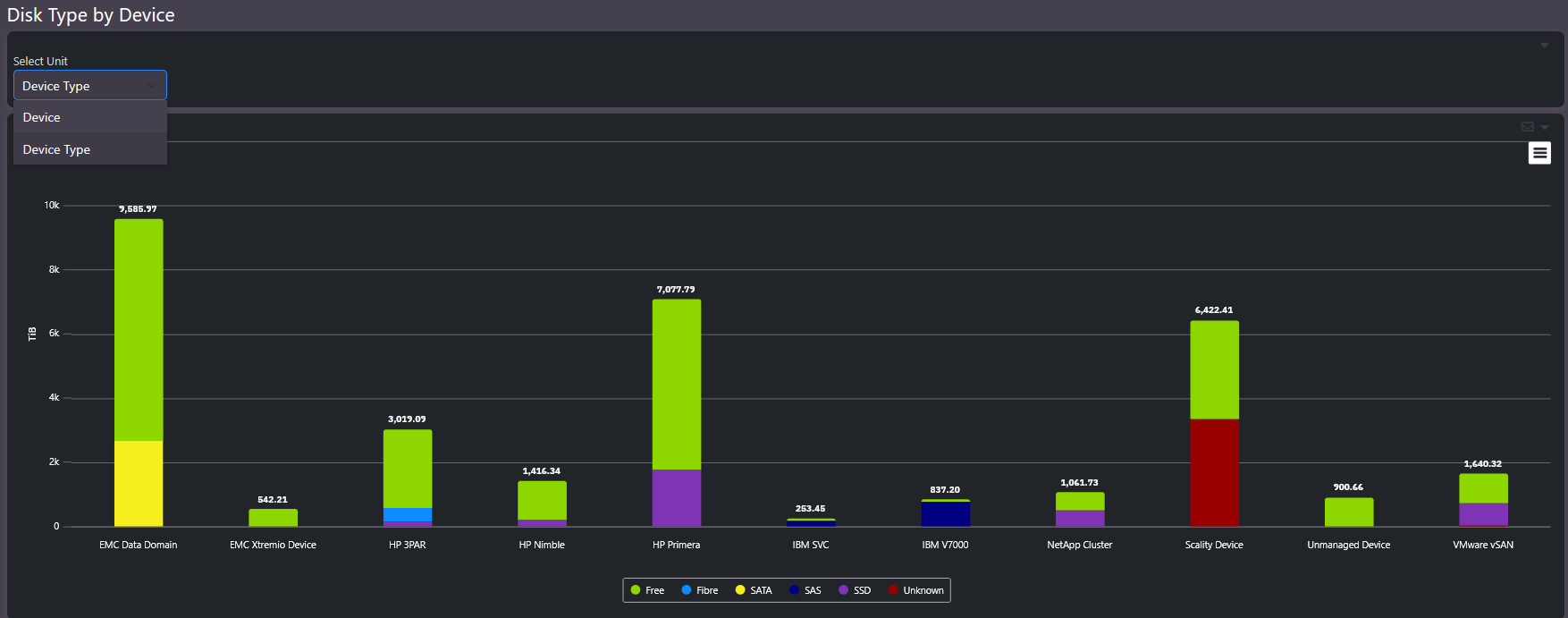
Disk Type by Device shows what each array is actually built from. Every device appears with its capacity split by media type. The question it answers is whether workloads sit on media that matches their performance needs.
What this screen shows
Capacity per device, colored by underlying disk technology: Flash, SSD, SAS, SATA, Fibre, and Unknown. High-performance devices built on flash and SSD stand apart from capacity-oriented devices on SATA. The unit selector switches between device-level and device-type views.
When to use it
- Performance triage. Cross-reference with the performance columns in Enterprise Summary. A device showing poor response time while carrying significant workload on slow media is a candidate for tiering or replacement.
- Refresh planning. The media mix identifies which arrays are the aging spinning-disk estate that modern flash consolidates at a fraction of the footprint.
Related screens
Enterprise Summary holds the IOPS and latency columns to compare against media type. Trends shows whether workload on older media is growing or draining.